Lemma · Pages
Documents you write with your teammate.
Type in a page like any doc. Ask your teammate and it writes, draws a chart or rewrites a passage right where you point. Everyone opens the same copy.
 Why trials stall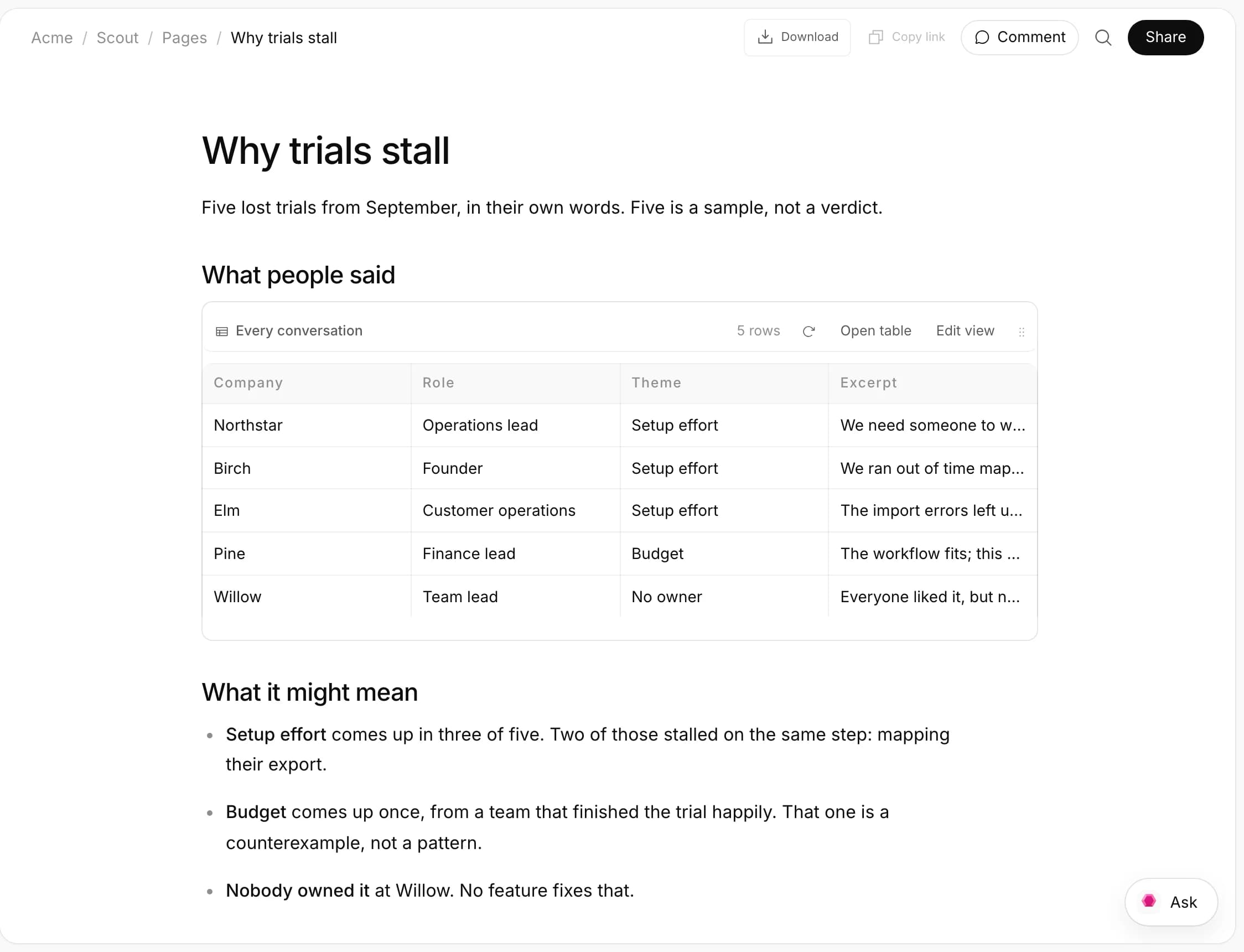
Scout’s research memo, with a view of the interviews table.
Why pages
Chat is for working it out. A page is where it stays.
A good answer in chat scrolls away by tomorrow, and only the people in that thread saw it. A page keeps it where the whole team can open it, comment on it and keep it current: you by typing, your teammate when asked.
The thread moves on. The page doesn’t.
Tuesday
Dev
Redwing has the walkthrough video.
Aditi
Harbor is signed. Handing it to June.
Priya
@Remy what’s stuck in the pipeline?

Remy
Two deals can close by Friday. One is stuck on us: Northstar is waiting on the security overview.
Wednesday
Aditi
who has the Saltbox order form?
Dev
moving standup to 10
Thursday
Priya
Fern Works wants the Harbor case study
Aditi
can someone take the 3pm demo?
Pipeline this week
Two deals can close by Friday. One is stuck on us.
| Company | Stage | Next step |
|---|---|---|
| Northstar | Procurement | Send the approved security overview |
| Cedar Health | Evaluating | Hold: Priya spoke to them yesterday |
| Birch | Discovery | Book a call with their ops lead |
| Oak & Ivy | Evaluating | Answer the SSO question |
Stuck on us
Northstar asked for the security overview on Tuesday. The approved version is drafted and waiting for your yes.
Writing
Ask from the spot you mean.
There’s no edit mode: you type, and it saves. When you want help, ask from inside the page, and the words land where you were looking. Its edits never overwrite anything you haven’t saved.
Only the selected passage changes.
Why trials stall· a pageWhat it might mean
- Setup effort comes up in three of five. Two of those stalled on the same step: mapping their export.
- Budget comes up once, from a team that finished the trial happily.:That one is a counterexample, not a pattern.
- Nobody owned it at Willow. No feature fixes that.
What would change our mind
What we'll try
AskScoutOn Why trials stallScout
Working1 stepMade the Budget point one sentence and left the rest as it was.
- At the cursorType /, choose Ask to write, say what goes there.
- On a passageSelect it, choose Ask for change: “shorter”, “warmer”, “make it a table”.
- In the page’s chatTalk it through beside the page, then say “put that in”.
Visualize
Ask for a chart. It appears where you typed.
Type /, choose Visualize and name it: interviews by theme. Your teammate finds the numbers in the page, a table or the web, counting only rows you can see, and draws the chart in place with the finding on top. It’s a snapshot; ask again to refresh it.
Pulled from the interviews table, drawn in place.
Why trials stall· a pageWhy trials stall
Five lost trials from September, in their own words.
What people said
Scout is writing: a chart of the themesTable interviews
| Company | Theme |
|---|---|
| Northstar | Setup effort |
| Birch | Setup effort |
| Elm | Setup effort |
| Pine | Budget |
| Willow | No owner |
Table views
Put the table itself in the page.
A pasted list is out of date by Thursday. A table view is a query, not a copy: pick a table, filter, group and sort, or write SQL. It reads the rows each time the page opens, as whoever is reading, so each person sees their part.
Marked Ready in the table. The brief caught up.
 Team plans launch· a page
What has to ship
Table launch_assets
| Asset | Status |
|---|---|
| Launch post | In reviewReady |
| Pricing page copy | Drafting |
| Demo video, 90s | Drafting |
| Press release | In review |
| Changelog entry | Ready |
| Onboarding email | Ready |
Widgets
Drop a small working tool into the page.
A what-if on this month’s deals, a pricing calculator, a checklist that scores itself. Type / and choose HTML, or ask your teammate to build it. It runs sandboxed in the page, and you change it by asking: “add a total row”.
A what-if, built into the pipeline page.
Remy /Pipeline this weekAskComments
Mention your teammate, and the comment gets done.
Comments pin to the words they’re about and survive rewrites. Mention a person and they’re notified. Mention your teammate and it reads the page, makes the change and replies in the thread, with a Watch link while it works.
@Scout: edited, and replied in the thread.
The rest of its space
Every part of the job, in one place.
Which plan is lost in a chat thread?
Start a page from the guide template. It explains pages by being one.
Why trials stall
Five lost trials from September, in their own words.
What it might mean