Lemma · Workflows
Work that passes through several hands.
A workflow runs a job the same way every time. Some steps go to your teammate, some run code, and some wait for one named person to decide.
June’s import check, waiting on Dev.
Why workflows
The steps take minutes. The handoffs take days.
A first import: check the rows, fix the dates, get a sign-off, run it. It drags for a week because the fixed file sits unseen and the approver doesn’t know it’s their turn. A workflow writes the handoffs down, so nobody has to remember.
One import, from new row to finished.
 First import check· a run
Table imports
| Customer | Rows |
|---|---|
| Fern Works | 96 |
| Moss & Co | 312 |
| Birch | 58 |
| Harbor | 1,840 |
- Check every rowNot yetRunningDone04128971,3661,840 rows · 212 won’t import
- Anything that won’t import?Not yetDone
Prepare a corrected file
blocking > 0- Prepare a corrected fileNot yetRunningDoneharbor-fixed.csv · original kept
- Dev approves the fixNot yetWaitingDone
Run the import
blocking == 0not taken- Run the importNot yetRunningDone
- FinishFinished
JuneFirst import check needs your input.When to make one
Ask once in chat. By the fourth time, make it a workflow.
The first time, work the job out together in chat. Once you’ve asked for the same thing three Mondays running, it has a shape: a fixed order, named people, the same result however it’s asked.
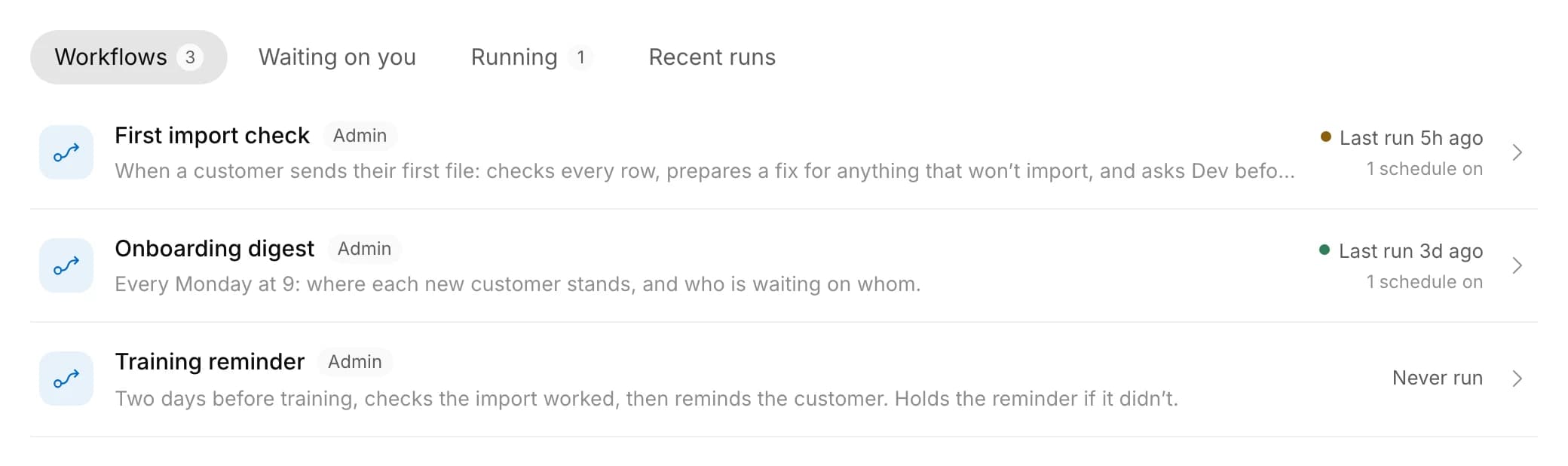
Three jobs that keep coming back.
Steps
Seven kinds of step.
Three do the work: your teammate reads and drafts, code does what must be exact, a person decides. Four steer the run. Each step hands what it found to the next.
Seven kinds of step, one run’s path.
June· a runStartingRunningWaiting on a timerWaiting on a personCompletedSteps
Hands it to June
212 won’t import
Branches
Repeats for each item
Pass 1Pass 2Pass 3Waits
Waited 2 days
Asks a person
Waiting on DevDev answered
Runs code
Done
Ends the run
Finished
- Hand to your teammateA real conversation you can read or join.
- Ask a personOne named person fills in a short form.
- Run codeExact work: validate, total, write, call another system.
- BranchThe first rule that matches picks the path.
- RepeatThe same steps for each item in a list.
- WaitPause for a set time, then carry on.
- EndWhere a path finishes.
How it starts
It starts itself, with one person’s access.
By hand, on a schedule, when a row changes, or when a connected app sends something. Every run acts as one person, so it never reaches further than they could.
Four ways a run begins.
Workflows· how each one startsHow it starts
Onboarding digestA schedule, on the times you choose.
Runs as whoever turned it on.
How it starts
First import checkA row added in imports.
Runs as whoever owns the row that changed.
How it starts
Customer questionsA new email, through your own connected account.
only emails from customers
Each person turns it on for themselves; it runs as them, with their own accounts.
How it starts
Training reminderSomeone presses Run now.
Runs when someone starts it, as that person.
- Run nowRuns as you.
- On a scheduleOnce or repeating, as often as every 15 minutes.
- When a row changesAdded, changed or removed, optionally on a condition.
- When an app sends somethingA new email or message, through someone’s own account.
Your turn
It asks you once, in the chat you already use.
When a step needs someone, your teammate messages them on Slack, Teams, WhatsApp, Telegram or email. Dev replies “Yes, import it. Tell Harbor the dates are fixed.” The form fills in from his words, and the run moves on.
Dev replies in a sentence. The run moves on.
JuneToday
First import check needs your input.
It asks for: Import the corrected file, Note for June.
Yes, import it. Tell Harbor the dates are fixed.
Submitted for you. The import is running now.
First import check
Waiting on a personRunningSteps
- JunePrepare a corrected fileDone57m
- A personDev approves the fixWaitingDone4h so far4h
Import the corrected file *
Note for June
Tell Harbor the dates are fixed.
Submit- run-importRun the importNot yetRunning2s so far
- Finish
- Or in the appWaiting on you lists every pending step, oldest first.
- Only themNobody else can answer it.
- Never stuckUnanswered after 72 hours, the run stops and says why.
The record
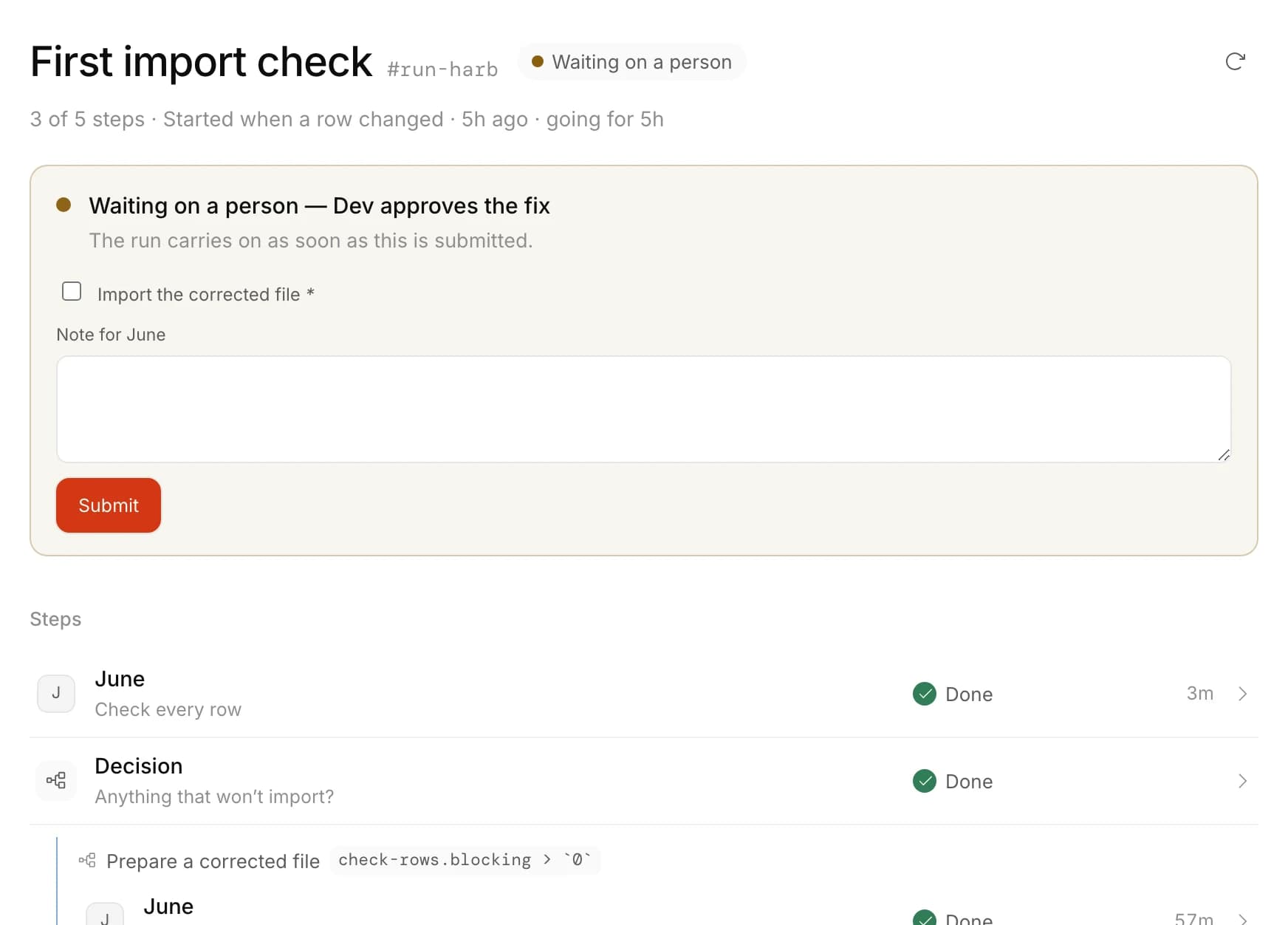
Every run leaves a page that explains itself.
How far it got, what started it, where it’s waiting, and each step’s result and timing. A failed run names the step and the reason, so repeat failures stand out.
Three steps done, waiting on Dev.
Making one
Describe the job. Your teammate writes the steps.
There’s no diagram to draw. Explain the job as you would to a new hire, read the steps it writes, then switch it on. To change it, ask again; the reasons stay in its chat.
One sentence in, the steps out.
June /WorkflowsWhat should June work on?
Send a message to start a new conversation.
When a customer sends their first file, check every row, fix what won’t import, and ask Dev before it runs.
June
WorkingWriting the stepsWorked for 52sMade First import check. Read it through, then turn it on.
First import check
Ask to change itHow it starts
A row added in imports.
How it runs
- Check every rowHands it to June
- Anything that won’t import?Branches
- Prepare a corrected fileHands it to June
- Dev approves the fixAsks a person
- Run the importRuns run-import
- Ask me firstIt prepares, a person approves, then it goes out.
- Only the unsure onesClear cases pass; people see the edge cases.
- Failures become tasksA problem becomes a form for whoever can fix it.
The rest of its space
Every part of the job, in one place.
Who doesn’t know it’s their turn?
Describe the job and who signs off. It runs itself from then on.